

Understanding the TCP/IP protocol
To send and receive data over the Internet, all communication must follow the TCP/IP protocol. For example, when sending the text “ABC”, it is not transmitted as plain text. Instead, the data is packed into a so-called “data packet” that is encapsulated with a header and a trailer. The header and trailer contain information about the data itself, as well as the sender and receiver IP addresses and the MAC address.
The MAC address is a unique identifier assigned to all network devices. Even if the IP address is unknown, a network device can still be addressed using its MAC address.
An IP address is a logical address used to identify devices on the Internet. In addition to an IP address, a connection may also include a port number. The port number specifies which service is being used. For example, some port numbers are reserved for specific services, such as port 23 for TELNET and port 80 for HTTP.
The subnet mask is used to calculate the network address, host address, and address range (how many IP addresses can be used within the reserved address space). This is done using bitwise logical AND and NOT operations. The gateway address specifies through which address packets are sent to the Internet.
The concept of a TCP client and server
UDP (User Datagram Protocol) is a connectionless communication protocol, whereas TCP (Transmission Control Protocol) is a connection-oriented protocol. A “connection” refers to the preparation that ensures the communication is reliable before data transmission begins.
For a successful connection between a server and a client, one side (the TCP server) passively waits while the other side (the TCP client) actively attempts to establish a connection. Once the TCP connection is established, data can be exchanged between client and server.
When using UDP for communication between client and server, there is a high risk of data loss, because the client sends data without knowing whether the server is ready to receive it. Lost data is not detected and is therefore not retransmitted. A TCP connection, on the other hand, verifies that all transmitted data is received and reports whether any data is missing.
What you need to know to establish a TCP connection
To establish a connection between two TCP/IP devices, certain address and network parameters must be known for both the server and the client.
Information required for a TCP server (passive)
- IP address (local IP)
- Port number on which connections are expected (local port)
- Information to verify the same network (subnet mask)
- Path to other networks (gateway)
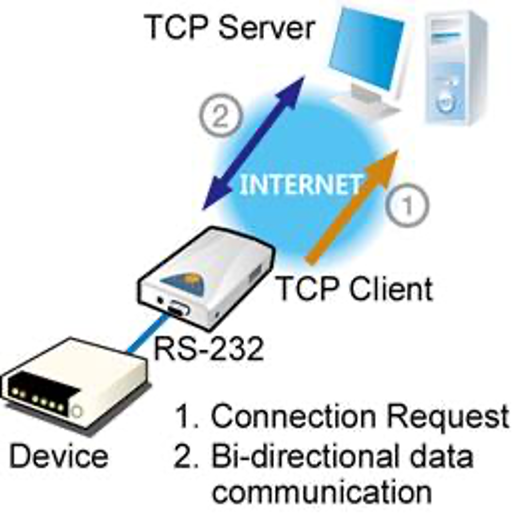
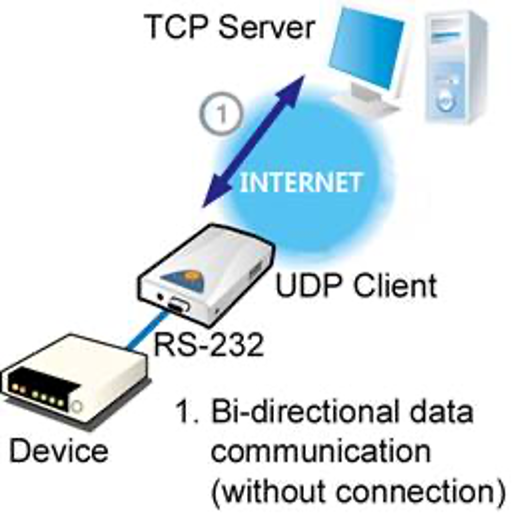
Information required for a TCP client (active)
- IP address (local IP)
- Destination IP address (TCP server IP)
- Destination port number (TCP server port)
- Information to verify the same network (subnet mask)
- Path to other networks (gateway)